WebGL 3D Product Configurator Development Services

Category:
Digital Thread vs Digital Twin: What's the Difference?
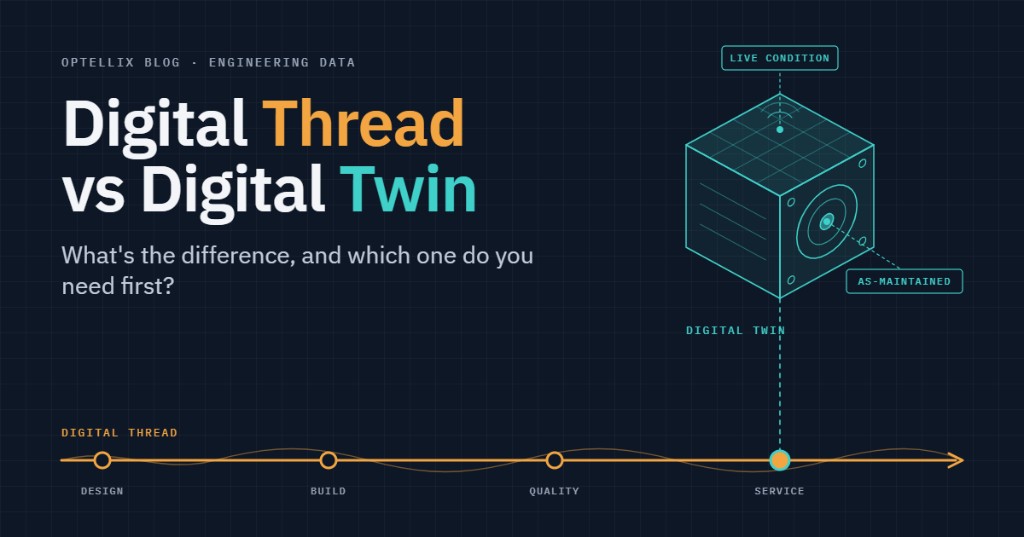
A digital thread connects product and process information across systems and lifecycle stages. A digital twin uses a synchronized digital representation to understand, monitor, or predict the behavior of an asset, process, or system. The thread makes information traceable; the twin uses relevant information to answer an operational question.
| Digital thread | Digital twin | |
|---|---|---|
| What it is | Connected, traceable lifecycle data | A synchronized digital representation |
| Scope | Information across lifecycle stages | An asset, process, facility, or system |
| Relationship | Can connect data used by multiple twins | Can use multiple models and data sources |
| Time orientation | Design history, changes, and downstream feedback | Past and present state; predicted behavior |
| Fed by | Design, production, quality, and service systems | Models, configuration, measurements, and operating data |
| Produces | Traceability to an authoritative source | Insights for a defined use case |
| Example | Tracing a part revision into manufacturing | Assessing a machine's operating condition |
| Relevant standards | STEP, QIF, and MTConnect for data exchange | ISO 23247 for manufacturing twins |
| Can exist without the other? | Yes, traceability has standalone value | Yes, with reliable data for its defined scope |
| Typical failure mode | Stops at a system boundary | Stale inputs or an unvalidated model |
| You need it when | Data is siloed across the lifecycle | You need insight into real-world behavior |
Key Takeaways
- A digital thread connects lifecycle information. A digital twin represents an asset, process, or system for a specific use case.
- A useful twin needs appropriate data, synchronization, and validation. A detailed 3D model alone does not establish these.
- An enterprise-wide digital thread can strengthen a twin, but it is not a prerequisite for every focused twin application.
- PLM, CAD integration, and browser-based visualization serve different roles. Define the missing capability before choosing a platform.
- Start with the decision you need to improve, then identify the data, model, and access needed to support it.
What is a digital thread?
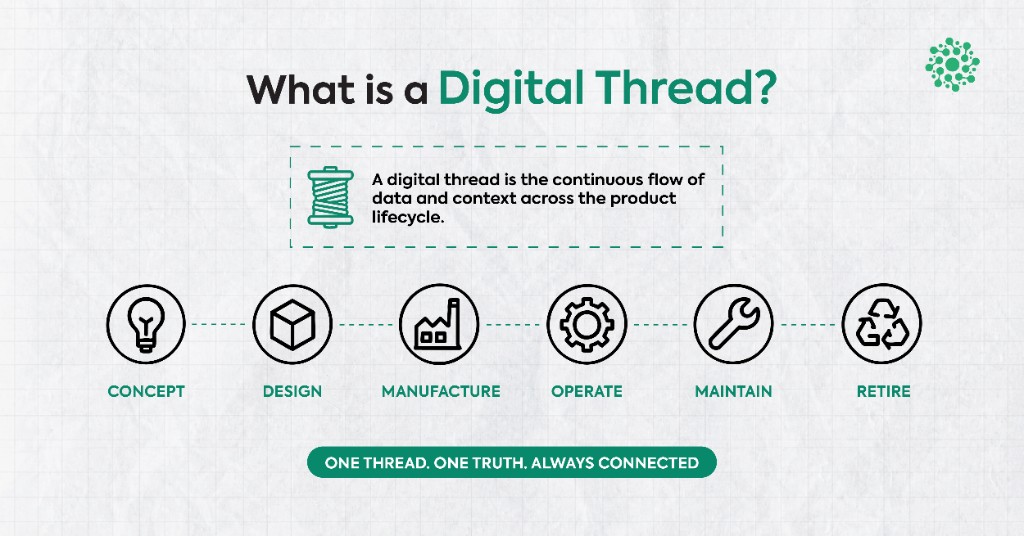
A digital thread links related information across a product's lifecycle so teams can trace a requirement, design revision, manufacturing record, or service event to its source. It is an integration and information-management approach, supported by software and agreed working practices.
The practical requirement is traceability. Moving a file between two systems is useful, but teams also need to know which revision it represents, what changed, and which downstream records depend on it.
Consider a field technician checking whether a pump shipped with a revised impeller. A connected record of design, build, and service changes helps answer that question without reconstructing the history from emails.
NIST's Digital Thread for Manufacturing program focuses on communicating product information across design, manufacturing, and quality activities, including feedback to engineering. That is a useful starting point for understanding the thread's role.
Neutral formats such as STEP remain valuable for exchanging engineering data. The problem often lies in repeated manual exports, lost metadata, and files that become stale after distribution. A thread needs a reliable way to preserve identity and track changes across those handoffs.
For more on exchange formats, see our guide to STEP files. For the broader lifecycle view, see our digital thread guide.
What is a digital twin?
A digital twin is a digital representation connected to the real-world asset, process, or system it represents. ISO 23247-1 provides a framework for manufacturing digital twins. The Digital Twin Consortium's definition emphasizes synchronization at a frequency and level of detail appropriate to the use case.
Two questions help separate a useful twin from a visualization demo.
What keeps the representation current?
Identify the measurements, records, or events that update it, and how quickly those changes need to appear. Continuous streaming is useful for some applications; others can use periodic or event-driven updates.
What decision does it support?
A maintenance application may focus on condition and failure risk. A warehouse application may focus on flow or capacity. Model the behavior needed for that decision and test whether the results are dependable.
A 3D view can help people interpret the information, but visual realism is not a substitute for synchronization or model validation. Conversely, a useful twin does not always need a detailed 3D interface.
The scope can extend beyond a single machine to a production process, warehouse, or connected system. The boundaries should follow the operational question being asked.
A digital mockup supports design review and validation. A synchronized operational twin serves a different purpose. Our digital mockup guide explains that distinction in more detail.
Where do PLM and CAD visualization fit?
Product lifecycle management (PLM) can provide controlled product definitions, revisions, and engineering change records. It is an important source for many manufacturing threads and twins, but it does not hold every operational fact.
Manufacturing execution, enterprise resource planning, quality, and service systems may hold other parts of the record. The digital thread connects the relevant information and preserves the relationships between it.
For an equipment twin, distinguish three states: as-designed is the intended specification; as-built records what was manufactured; as-maintained reflects subsequent repairs and replacements. Use the state relevant to the decision, and retain its history.
A CAD integration carries geometry and associated engineering information into another tool. A visualization layer helps people inspect that information. Neither capability, on its own, establishes lifecycle traceability or a synchronized twin.
PLM platforms may already offer viewing tools and access for people who do not author CAD models. Where downstream teams still struggle to inspect current geometry, a browser-based 3D viewer can help. Evaluate its revision handling, permissions, and connection to the source system, as well as its rendering performance.
Can you have one without the other?
Yes. A digital thread can support change control, quality investigations, and service traceability without an operational twin. A focused twin can also work with a limited set of trustworthy inputs before a company connects its entire lifecycle.
For example, a machine-condition twin might combine measurements with a validated model and current equipment configuration. A broader thread can later connect those inputs and results to engineering changes, production records, and maintenance history.
The limitation of a disconnected twin is its scope. It may answer a condition-monitoring question well while lacking the history needed to explain a configuration change. That does not automatically make it a dashboard. Ask which decisions it can support and which records it can trace.
Imagine a gearbox showing rising bearing temperature. The measurements describe its condition; the maintenance record identifies which bearing is installed. Connecting both helps the team interpret the reading against the actual configuration instead of assuming the original design is still in place.
A useful pilot therefore states its boundaries: the asset or process represented, the inputs it trusts, the update frequency, and the decisions it has been validated to support. Expand the connections when the next use case needs them.
What should you ask in a digital twin demo?
The label alone tells you little about a product's suitability. Ask the supplier to demonstrate the workflow you need using representative data and realistic scale.
Start with identity and freshness: which asset or process does this represent, where do its inputs come from, and how are configuration changes reflected? Check whether users can see when information was last updated and what happens when a feed is unavailable.
Then test usefulness: how was the model validated, what are its limits, and can your team act on the result? For a 3D interface, also test loading, navigation, and interaction with a realistic model. Attractive graphics cannot resolve missing records, and reliable data alone cannot fix an interface that becomes unusable at scale.
Which one do you need first?
Start with the bottleneck in the workflow. If teams cannot trace a revision across systems, prioritize the required thread connections. If they have trustworthy inputs but need to predict behavior or compare operating scenarios, a focused twin may be the next step.
You do not need to connect every enterprise system before testing a useful application. Choose a bounded use case, assign ownership of its inputs, and define how you will measure the result before expanding.
| Your situation | Priority | Why | First step |
|---|---|---|---|
| Data siloed across engineering and service | Thread | Revisions and dependent records are hard to trace | Map source systems, identifiers, and change ownership |
| Must monitor one asset class in the field | Focused twin | Condition analysis needs trusted inputs and a useful model | Confirm configuration, data quality, and validation |
| Regulatory traceability requirement | Thread | Evidence must be traceable to the relevant record | Identify the required records and revision history |
| Sales and service can't see current geometry | Visualization and access | Users need a usable view of approved geometry | Check existing viewing tools and source connectivity |
| Twin pilot has stalled after a good demo | Diagnose the constraint | Data, model validity, integration, or performance may limit scale | Test representative data and model size |
A stalled pilot does not prove that the data architecture is the only problem. Establish whether the constraint is missing history, unreliable updates, model validity, rendering performance, or unclear operational ownership.
Two implementation examples from Optellix
For CNPC USA, the challenge was preserving Creo face identities through tessellation so simulation data remained attached to the correct geometry. Optellix built a custom Creo Toolkit plugin and an automated design-to-tag-to-XML workflow.
Approximately 40 hours saved, with manual tagging errors eliminated in the reported CNPC workflow.
Source: Optellix's CNPC USA: Bridging CAD and Simulation case study. The reported saving has no specified recurring period.
For Synkrato's warehouse digital twin, the problem was rendering large rack configurations. Optellix replaced individual mesh spawning with server-built Unity asset bundles and GPU instancing to reduce draw calls and memory overhead.
The Synkrato project report describes faster loading and rendering. This is performance engineering within a twin application, distinct from the data continuity problem at CNPC's CAD-to-simulation handoff.
Frequently Asked Questions
What is the difference between a digital thread and a digital twin?
A digital thread links related information across systems and lifecycle stages. A digital twin uses a synchronized digital representation to support a defined decision about an asset, process, or system. They can work together, but they are not interchangeable.
Can you have a digital twin without a digital thread?
Yes. A focused twin can use reliable local inputs, configuration data, and a validated model without an enterprise-wide thread. Broader lifecycle connections become important when the use case needs engineering, production, or service history.
Is a digital twin part of PLM?
A twin may use information managed in PLM, but it is not inherently part of a PLM platform. Depending on its purpose, it may also use manufacturing, quality, maintenance, or sensor data.
Which comes first, the digital thread or the digital twin?
The use case determines the sequence. Resolve missing data ownership and revision traceability where those block the decision. Where the necessary inputs already exist, test a focused twin and extend its lifecycle connections as needed.
Is there a standard definition of a digital twin?
ISO 23247 provides a manufacturing-specific framework, while the Digital Twin Consortium offers a broader definition covering real-world entities and processes. Both are useful references when agreeing the scope and synchronization requirements of a project.
What to take from this
- Use digital thread work to improve traceability across handoffs and lifecycle stages.
- Use a digital twin when a synchronized representation can improve a specific operational decision.
- Treat CAD integration, data governance, model validation, and visualization performance as distinct requirements.
- Measure the pilot against the intended outcome, then extend the data connections and technical capacity needed to scale.
If your bottleneck is moving engineering data into a usable 3D workflow, explore Optellix's Web3D services. For a wider view of connected lifecycle information, continue with our digital thread guide.
.webp)
Never miss
Oops! Something went wrong while submitting the form.
Looking for Something Similar?
We have built everything from Creo plugins to AI-based VR walkthroughs. If your challenge feels like one of these — or somewhere in between — we would love to hear about it.
Feel free to share your details!
Oops! Something went wrong while submitting the form.